Nika Gamkrelidze Web developer

Selected work, as running software

Five products, running entirely in your browser.

Each one is the real front end of a product I built, with the back end taken out and replaced by seeded fixtures. Sign in with anything, change anything: nothing leaves the page, and a refresh puts it back.

Kestrel

Voice Operations Console

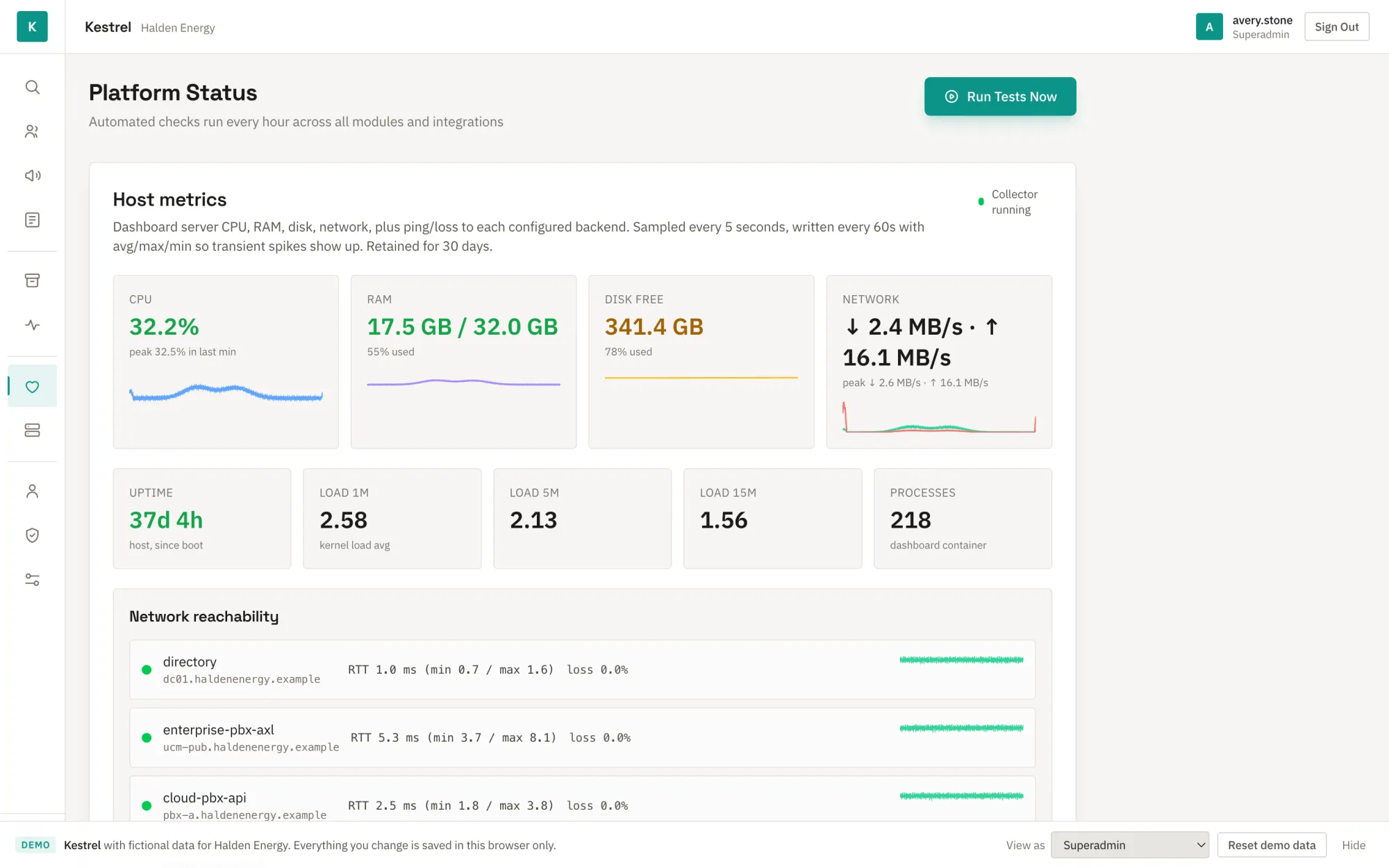
Kestrel's Platform Status screen: host metrics with sparklines and a network reachability list, beside an icon rail navigation.

What it is

A console for running a company's voice estate: search call records across two phone platforms, play and archive the recordings, manage contact-centre agents and outbound campaigns, provision extensions, and watch the platform's own health.

Permissions are enforced for real. The navigation and the pages change with the role you view as.

Try

Use Enter demo on the sign-in page. View as in the banner switches roles. Start an archive job and watch it finish in about twenty seconds; run the platform self-test and read why it is blocked.

Seam

A Mock Service Worker intercepts every /api/* request and answers from a seeded sessionStorage store. Sign-in still goes through the product's own Auth.js route, so the JWT, the middleware gate and every RBAC check are real.

Stack

  • Next.js 16 · React 19 · TypeScript
  • Tailwind CSS 4 · TanStack Table
  • MSW · Auth.js
  • ~350 calls · 45 users · 70 agents · 120 extensions
Trestle

Operations console for metered service delivery

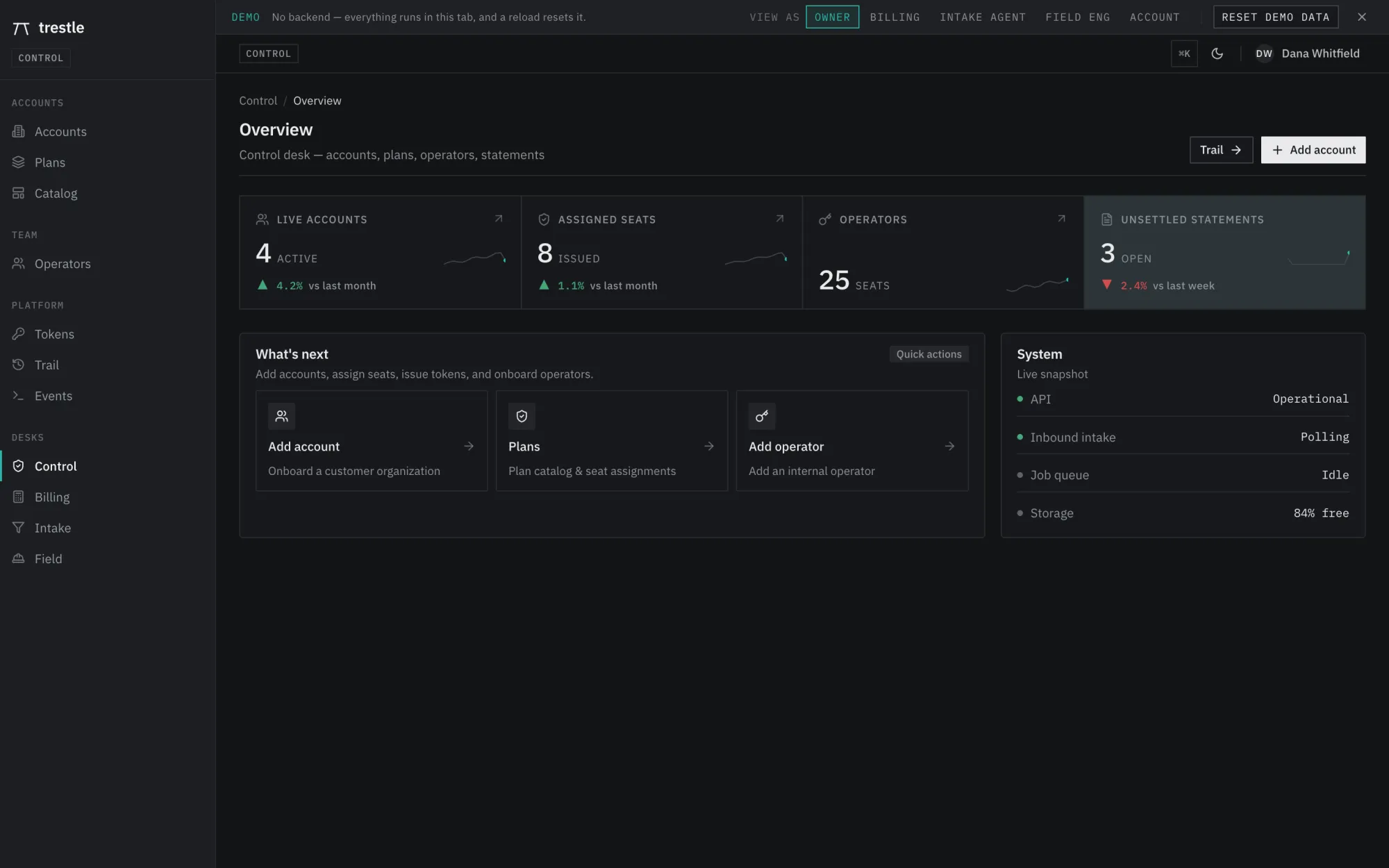
Trestle's Control desk overview: live accounts, assigned seats, operators and unsettled statements, with quick actions and a system snapshot.

What it is

Accounts, seats and plans, an intake queue, work orders, engagements and statements, seen from four internal desks (Control, Billing, Intake, Field) and from the customer's own Account Console.

Ordinary record-keeping works for real: create an account, price a catalog item, raise a work order and move it through its states, generate a statement and settle it. Lists, filters and the counters above them all update.

Try

Use Enter demo, then View as in the banner to move between desks. ⌘K opens the command palette. The few things a browser cannot fake, such as sending mail or rendering a PDF, say so when you click them.

Seam

The back end is replaced by an in-browser fake API. Every write lands in a client-side op-log that the server render reads back, so nothing needs a database and a reload resets the visit.

Stack

  • Next.js 15 · React 19 · TypeScript
  • pnpm workspace · shared zod contracts
  • Tailwind CSS · shadcn/ui · Tiptap

Alcove

Customer-support chat console

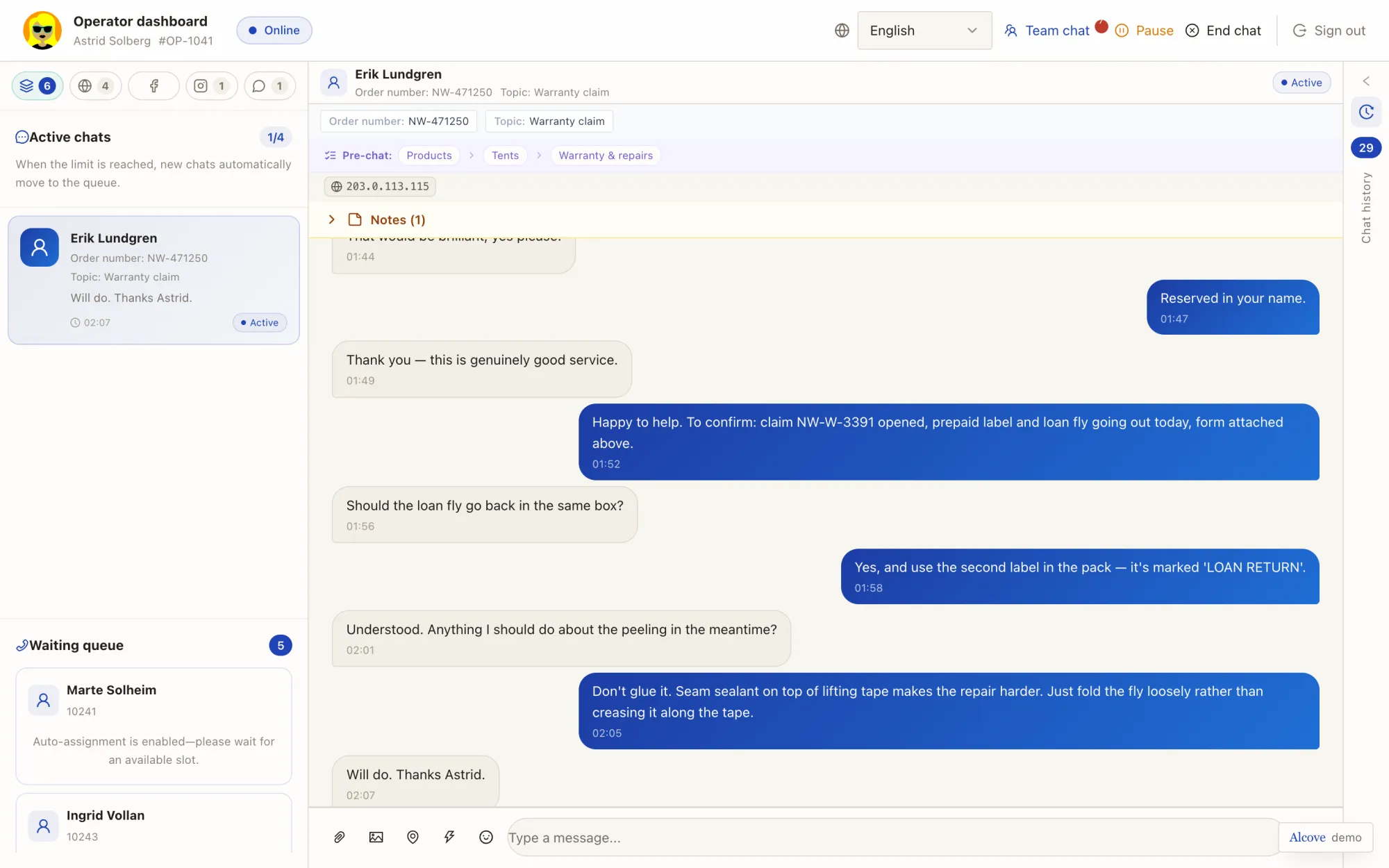
Alcove's operator inbox: a list of customer conversations beside an open chat thread with notes and quick replies.

What it is

Three surfaces of one product: the chat widget customers use, the operator inbox with notes and quick replies, and admin tooling for operators, settings, FAQ and reports. A tenant administration view manages workspaces across the whole installation.

The interface is in Georgian, English and Russian, and routes accept a language and tenant prefix.

Try

Start on the landing page and pick a surface: the customer widget, the operator inbox (any username and password sign you in) or team admin. The language switcher is on every sign-in screen.

Seam

A fixtures-only single-page app. An in-browser store drives every screen; nothing is fetched from anywhere, and the brand domain uses the reserved .example TLD so it can never resolve.

Stack

  • Vite · React · TypeScript
  • Tailwind CSS · shadcn/ui · Ant Design
  • TanStack Query · react-i18next

NORVA

Apple reseller storefront and CMS

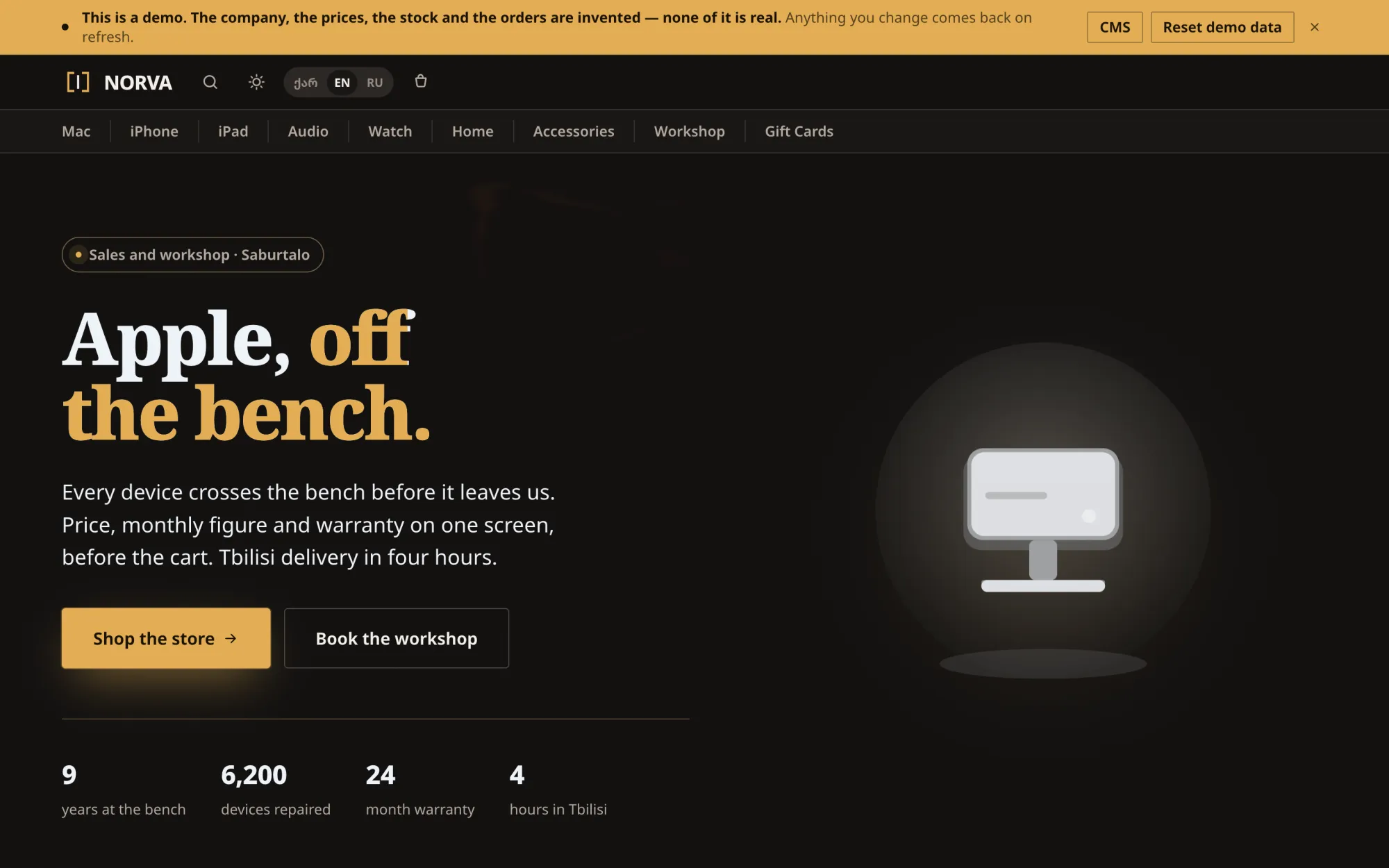
NORVA's storefront home: a dark page with a serif headline, a category navigation bar and a drawn desktop computer under a spotlight.

What it is

A trilingual shop (Georgian, English, Russian; prices in GEL) with a catalogue of 112 products across 8 categories, a cart, service bookings, and a CMS for products, banners, promotions, orders and stock.

There is no build step and no dependency. It is a plain tree of HTML, CSS and ES modules, served as-is.

Try

Browse the shop, then use the CMS button in the banner to open the admin side. Change a price or a stock level there and find it on the storefront. Light and dark themes are both measured for contrast.

Seam

State lives in memory in one store module, so a refresh is the reset; only language and theme touch sessionStorage. The catalogue artwork is 112 generated SVGs drawn from 29 hardware archetypes, so a device and its picture can never disagree.

Stack

  • HTML · CSS · ES modules
  • Zero dependencies · self-hosted fonts
  • Hash router · Canvas background

Kalo

Booth game for live events

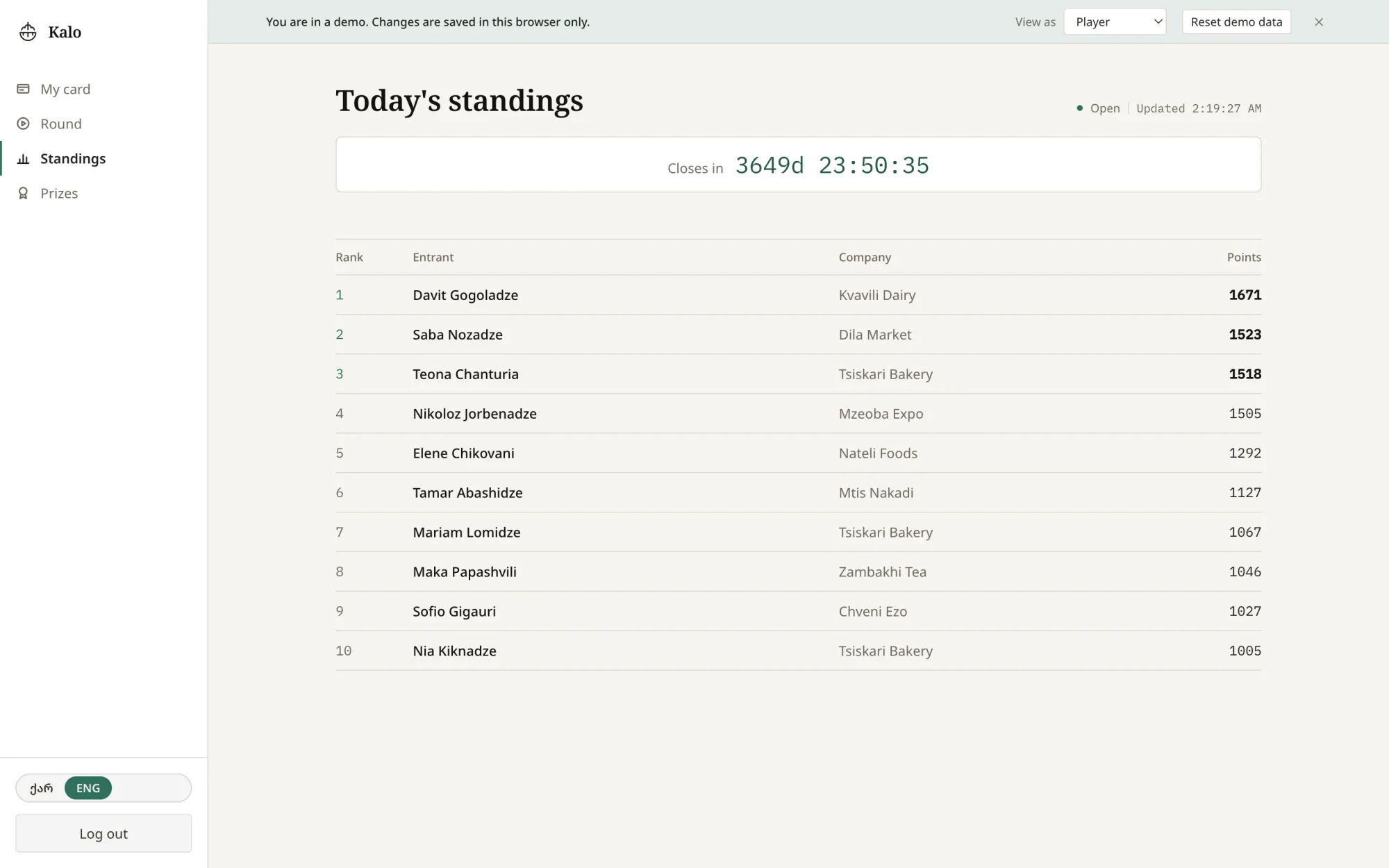
Kalo's standings board: a countdown to the end of the event and a ranked table of players, their companies and scores.

What it is

A visitor scans a code at a stand, registers, plays a 60-second round catching falling items, answers a few trivia questions for bonus points, and watches their name move on the standings board. Organisers run events, items, prizes, trivia and people from an admin console.

Georgian is the default language; English is one click away.

Try

Enter demo signs you in as a player: play a round, then check the board. For the organiser side, sign in as nino@kalo.example with the password kalo-demo-2026 (published on purpose; there is nothing to protect).

Seam

The API routes are still there, but a fetch shim sends them to an in-browser store, so the product's data layer is exercised without a database. Sign-in codes are shown on screen instead of emailed.

Stack

  • Next.js 16 · React 19 · TypeScript
  • Tailwind CSS 4 · zod
  • Canvas game loop · ExcelJS exports

How these were made

Each demo started as a private product build. The server side was cut at one deliberate seam per product, chosen so the front end stays untouched: components still call the same paths and receive the same shapes, status codes and pagination they always did. What you click is the product, not a reconstruction of it.

The data is generated from a fixed seed, with timestamps relative to the moment you load the page, so it never looks stale. Volumes are deliberate: pagination has pages, charts have a trend, filters have misses as well as hits, and every status badge appears somewhere. Each area also has an empty list, an awkwardly long name and a failed record, because those are the states a demo usually forgets and a real user meets on day one.

Every name, company, hostname and phone number was invented, route slugs and display strings were de-identified, and each shell was reskinned. The demos are marked noindex and make no outbound requests.